
Instead remembers every client

You know things about each client that no form will tell you. How they like to hear from you. The rental they sold in March. The question they asked in August. The plan memo you sent. When the return went out. How much risk they will take.
Instead remembers every client. Tell it once, and every chat about that client starts with it.
Short answer: Instead keeps memory for your firm, for you and for each client. Client memory holds what you know about that client, such as preferences, life events, questions, plans, returns delivered and risk tolerance. Every chat about that client starts with it. You can read it any time, correct one line, pause it or reset it.
What an AI that remembers client details does for a tax firm
Without memory, every chat about a client starts with you typing the background again. With client memory in Instead, the chat starts with what the firm already knows about that client.
The Memory dialog in the app says it plainly. “All users with access to this entity can see this context. Instead uses it to provide more relevant answers when working on this client.” The agent’s work is still a draft. You review it before anything goes to the client.
How Instead memory works at firm, user and client level
Instead has three kinds of memory. Each one is a document you can read, with its own Enable memory switch.
- Firm memory. Your firm’s standards, preferences and workflows. All firm members have access to it.
- User memory. Memory for you. It holds your own preferences.
- Client memory. One document for each client, called Entity memory in the app. All users with access to that client can see it.
Every conversation loads the memory that applies. A chat about a client starts with firm memory, your memory and that client’s memory.
Where to find client memory in Instead
Open the client menu, then Entity settings, then Entity memory, then Manage. The Memory dialog opens with tabs for User, Entity and Firm. Firm memory and User memory also sit in your firm settings.
Instead can add to memory from your conversations about a client. You can also tell it directly. Click the pencil and type in the bar that says “Tell Instead what to remember or forget about this entity.”
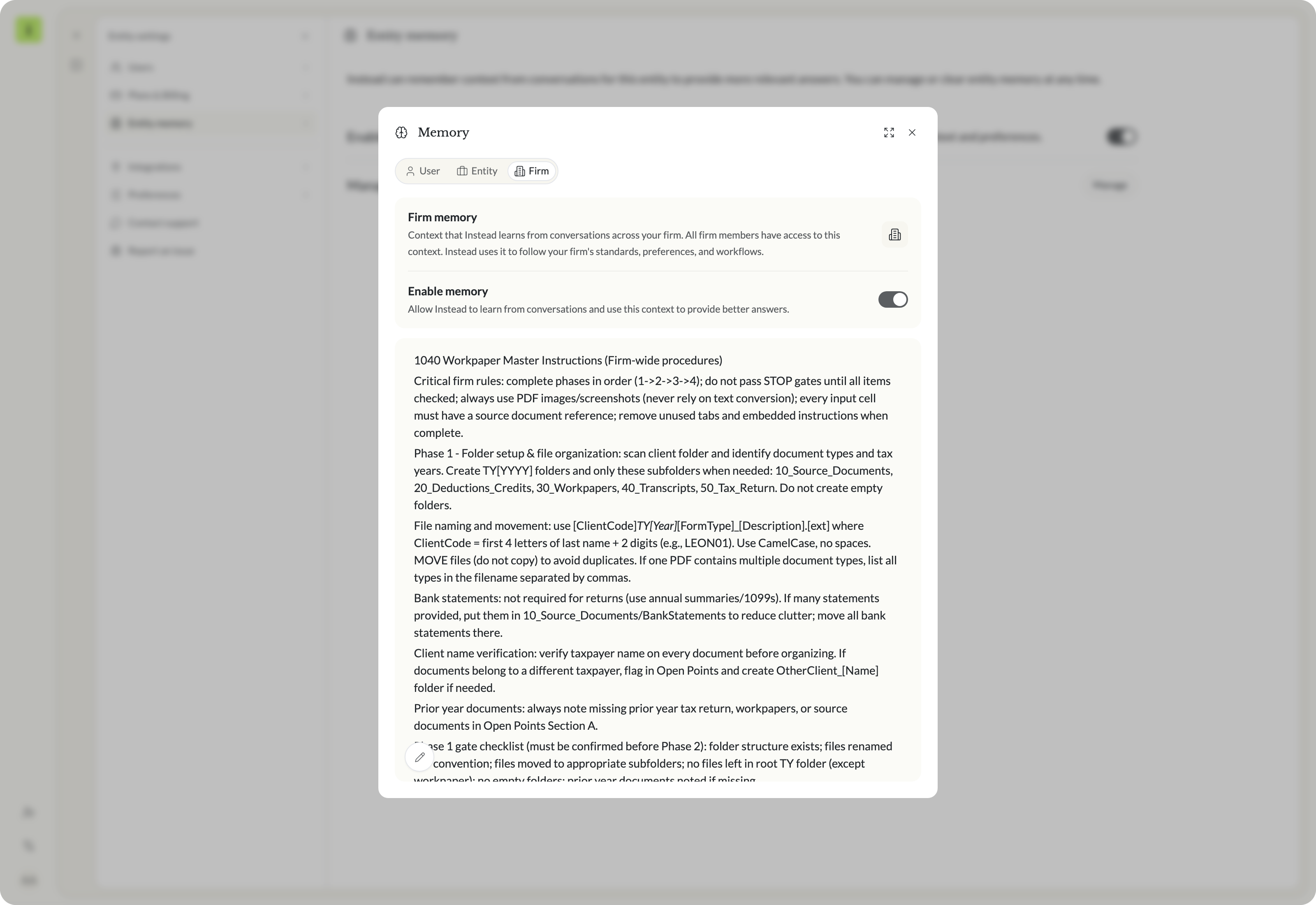 Firm memory holds your firm's procedures
What Instead remembers about a client
Six kinds of things are worth keeping for every client. Here is a demo client, Leopold & Saoirse Vantongeren, with one memory line for each, as Instead shows them.
Preferences
“Saoirse Vantongeren is the main contact and prefers a short email summary with action items at the top, rather than phone calls.”
Life events that change their taxes
“The Vantongerens sold their Portland, Maine rental condo on March 18, 2026. Expect capital gain and depreciation recapture on their 2026 return, plus a Maine nonresident return.”
Questions they asked
“On August 12, 2026, Saoirse asked about raising estimated tax payments after the sale. The Q3 estimated payment was increased, and Saoirse wants the final Q4 figure by email by December 4, 2026.”
Plans and memos you sent
“The 2026 tax plan memo was delivered on September 22, 2026, covering the Maine property sale, estimated payments, and a Roth IRA conversion review.”
Returns delivered
“Their 2025 Form 1040 and Massachusetts and Maine state returns were delivered on April 2, 2026, and e-filed on April 8, 2026”
Risk tolerance and decisions
“They are conservative on tax positions and want no aggressive positions. They chose to defer the Roth conversion to 2027 because 2026 is the sale year.”
A seventh line came later, when we told Instead one more thing. You will see it in the example below.
How client memory shapes a Q4 estimated tax payment email
We asked Instead to “Draft a reply to Saoirse on their Q4 estimate.” The prompt did not mention her preferences, the sale or the August question.
It already knows the client
Before it wrote anything, the agent said the client notes put the rental condo sale on March 18, 2026, that Q3 estimates were already raised, and that Saoirse wants the final Q4 number by email in early December. It also said it did not have the 2026 numbers on file. It asked how to handle the amount. We chose Placeholder draft now.
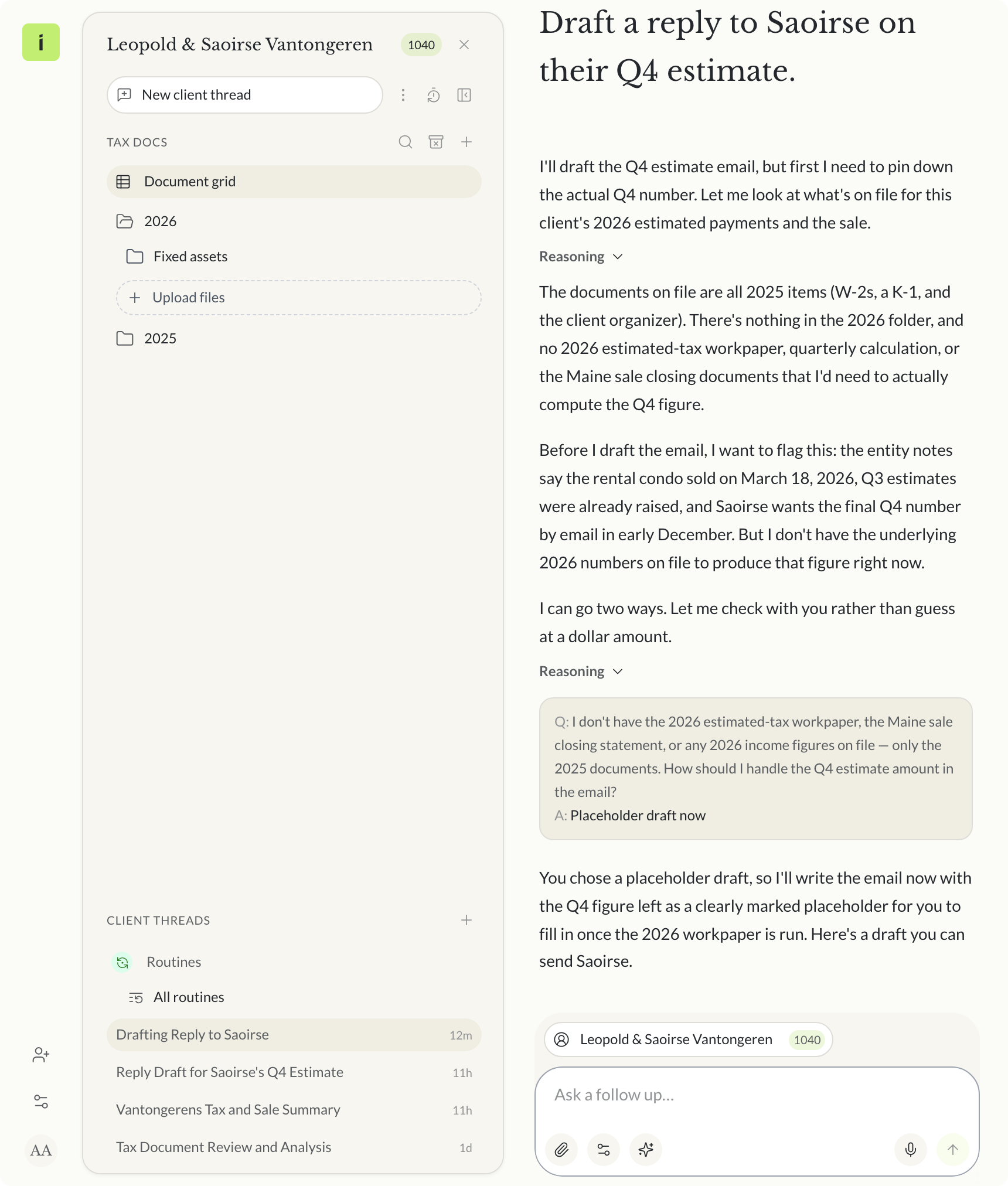 The agent starts from client memory, then asks about the amount
The draft follows what it remembers
It put the action item up top, as she prefers. It planned around the March sale and the Q3 raise, and kept it conservative. With no 2026 numbers on file, it left the amounts as placeholders and said so.
Three lines from the draft show where the memory went. “Here’s the summary and action item up top, as you prefer.” “As always, we’ve kept this conservative with no aggressive positions.” “I know email works best for you.”
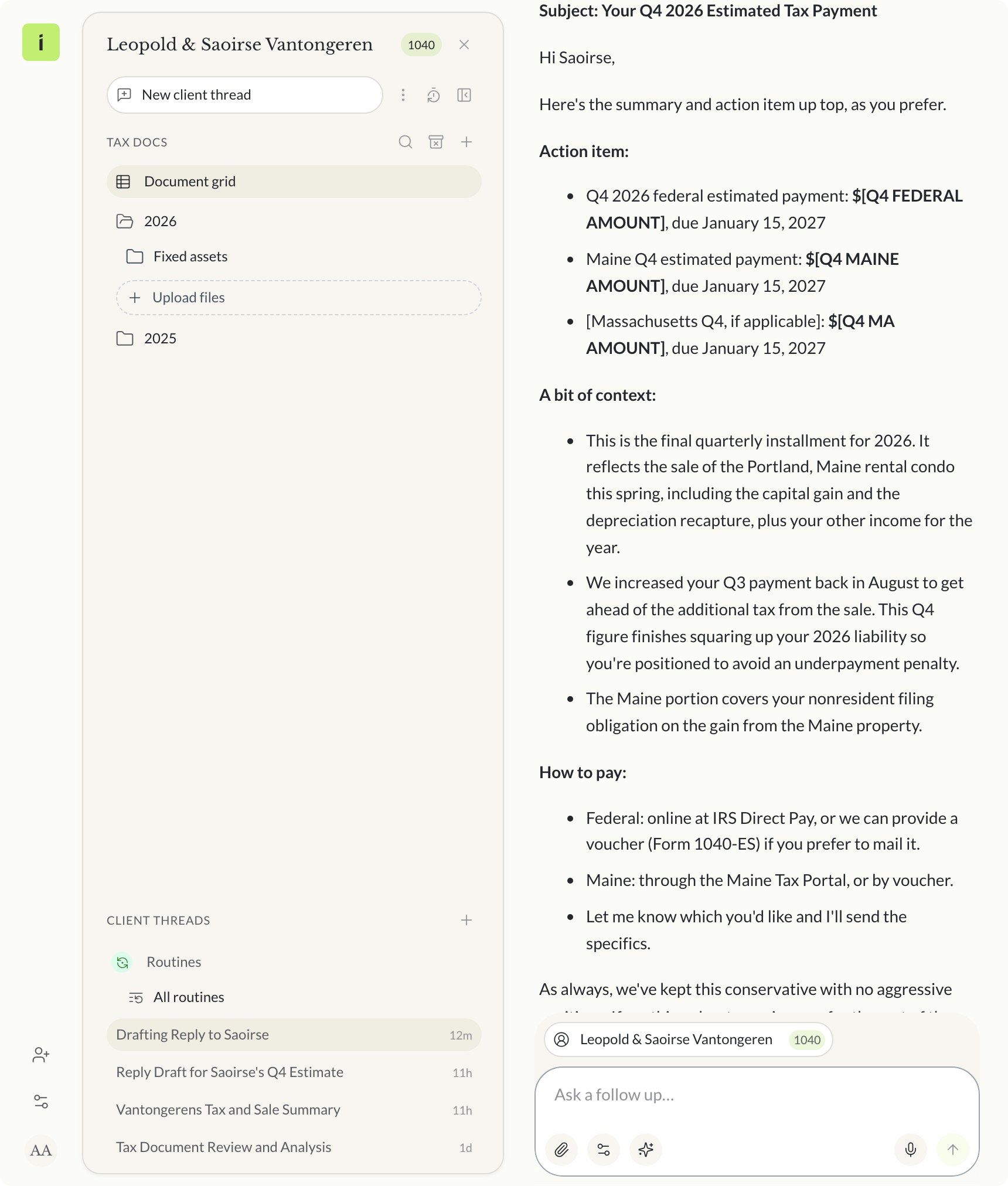 Action item first, amounts left as placeholders
The draft gives January 15, 2027 as the due date for both payments. Like every draft from the agent, it is for your review before it goes to the client.
Tell it once
After the draft, we told Instead one more thing in the Memory dialog. “Leopold wants a copy of every email about estimated payments.” It saved a new line. “Leopold requests a copy of every email regarding estimated tax payments.”
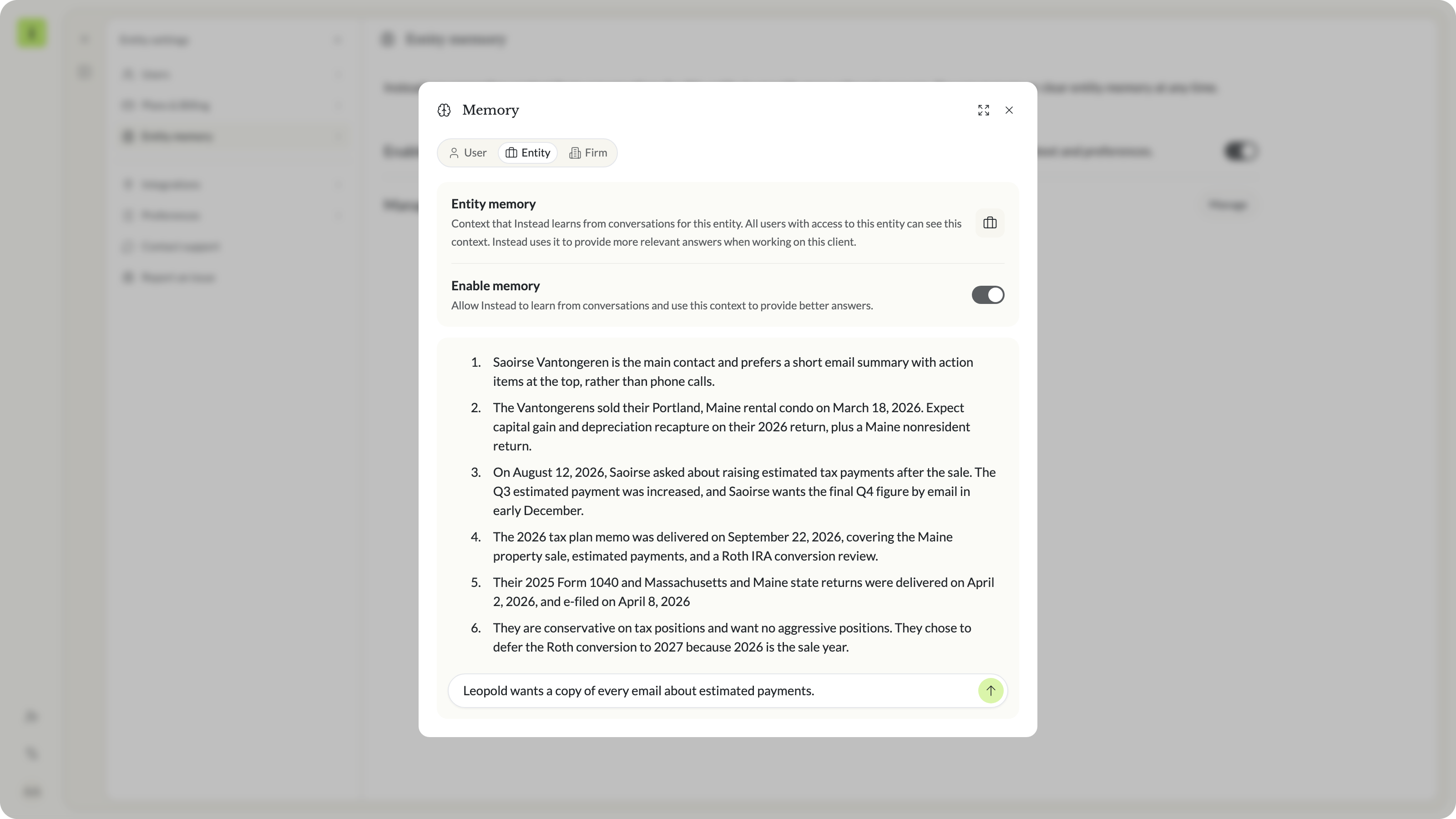 Tell Instead what to remember or forget
Correct one line
Then we corrected one line. We highlighted line 3, chose Make a correction and typed “She wants the final Q4 figure by December 4, 2026.” Only that line changed. It now ends “by email by December 4, 2026.”
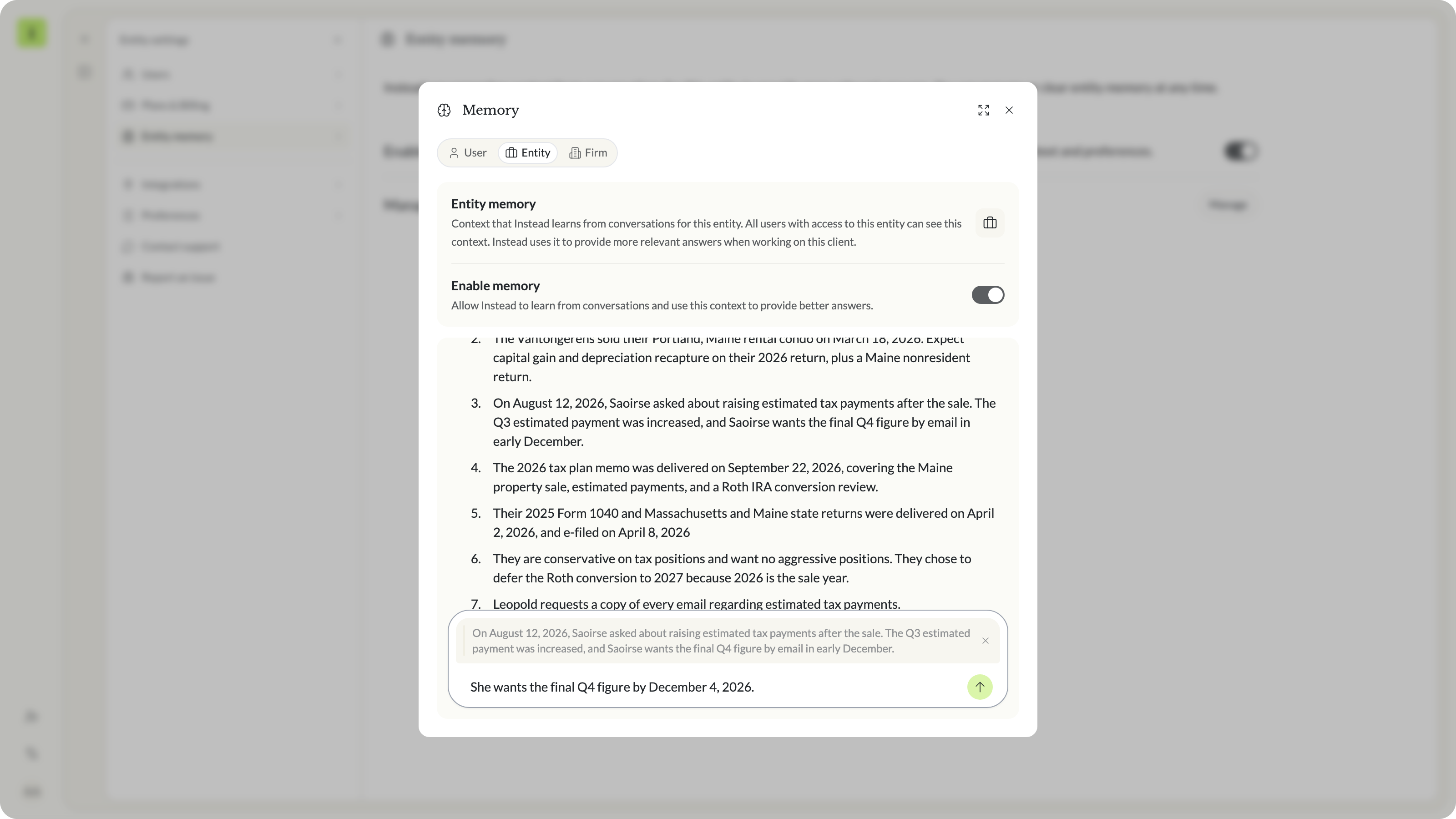 Highlight a line, then Make a correction
How to read, correct and control client memory
Client memory is yours to read and change. These are the controls in the app, with their labels as they appear.
- Manage. Opens the Memory dialog with the whole document. Read it any time.
- Tell Instead what to remember or forget. Click the pencil and type an instruction in your own words.
- Make a correction. Highlight a passage and type the fix. Only that passage changes, and the dialog shows what changed.
- Enable memory. Each memory has its own switch, for the firm, for you and for each client.
- Pause memory. “Instead keeps its existing memory but won’t use memory or make new memories.”
- Reset memory. “This will permanently delete all memories. This can’t be undone.”
What you can do with client memory by practice area
The Vantongeren example is one household. Here is what you can keep for other kinds of work. These are ideas, not templates. Only the example above was run for this post.
1040 households
You can keep who the main contact is, which spouse signs, a home or rental sale, a new child, and the documents that always arrive late.
Business entities
You can keep the accounting method, the states the entity files in, the ownership split and elections the owners made.
Tax planning
You can keep the plan memo you delivered, the decisions the client made, what they deferred and why, and how much risk they will take.
Notices and resolution
You can keep which notice arrived, what you sent back and when, and what you told the client about the next step.
Client communication
You can keep how each client likes to hear from you, who gets a copy, and the dates you promised.
How Instead memory compares with ChatGPT and Claude memory
General AI assistants have memory too. This is how each one describes it, from public pages we read on October 23, 2026.
ChatGPT. OpenAI’s help article Memory in ChatGPT says ChatGPT can remember relevant preferences and details from your chats. You can review a memory summary and correct it, including by highlighting text. The page showed it was updated October 22, 2026.
Claude. Anthropic’s post Bringing memory to Claude (September 11, 2025, updated October 23, 2025) says Claude remembers your team’s processes, client needs, project details and priorities. Each project has its own memory, and you can view and edit what Claude remembers. The Claude help article on chat search and memory, updated October 21, 2026, explains how to review and edit what is saved.
Instead. Memory belongs to each client in your firm’s client list, next to that client’s documents and threads. Everyone with access to that client sees the same memory, and every chat about that client starts with it.
What client memory does not do
- No edit history or undo. The memory screens do not show past versions. Reset memory can’t be undone.
- No memory in the public API. The Instead API has no memory endpoints today. You read and change memory in the app.
- Not a workpaper. In the example, memory had the dates and decisions, not the 2026 numbers. The draft used placeholders.
- A draft for your review. Memory gives the agent context. You still review what it writes.
What to ask before you commit to an AI assistant that remembers clients
Memory is only useful if you can see it and fix it. These questions test that on your own clients.
Questions to ask before you commit:
- Can I read everything it remembers about one client, in one place?
- Can I correct a single line without retyping the rest?
- Is client memory kept separate from firm memory and from my own?
- Can I pause it, and can I reset it?
- Does every chat about that client use it, or only some?
Client memory belongs in your tax platform
What you know about a client should be there every time you work on them. On the Instead AI tax platform, firm, user and client memory load into every chat that needs them, and you can read and correct every line.
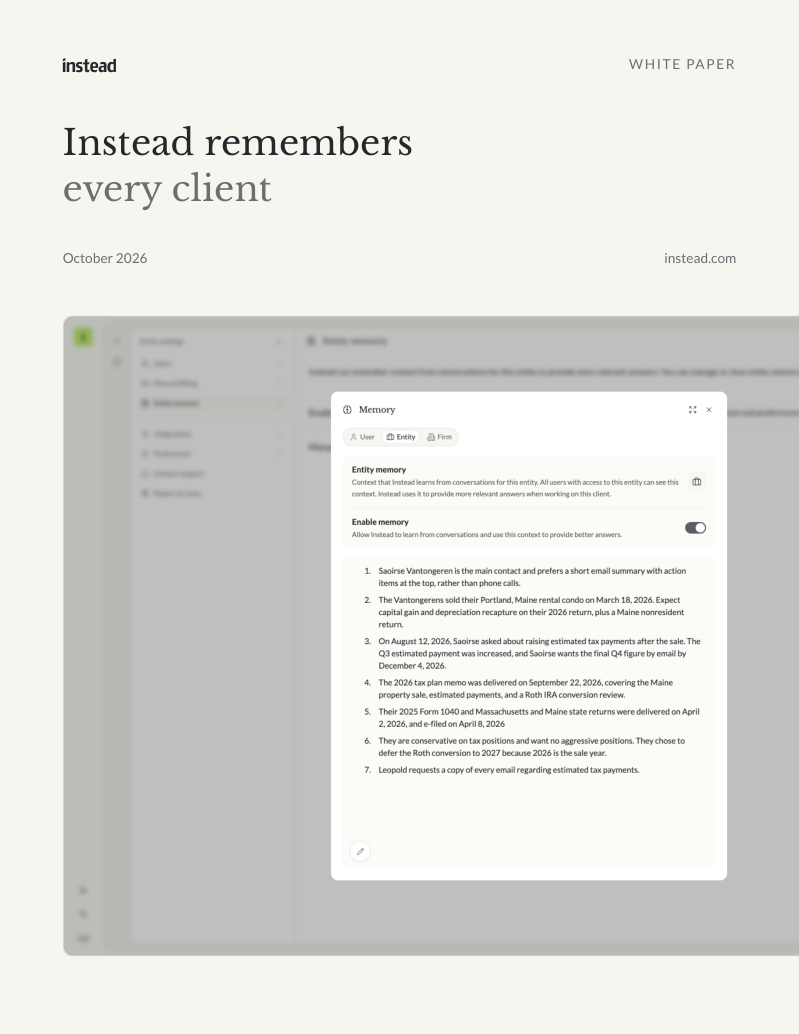
Free white paper
Instead remembers every client
How memory works for your firm, for you and for each client, with a worked example
The three kinds of memory, six things worth keeping for every client, a worked Q4 estimate example and the controls. Free PDF.
Download the white paperTo try it on your own clients, start your trial at instead.com.
Frequently asked questions
Q: What does Instead remember about a client?
A: Whatever you or the agent save to that client's memory. A useful set covers six things. Preferences, life events that change their taxes, questions they asked, plans and memos you sent, returns delivered, and risk tolerance and decisions. Each line is plain text you can read in the Memory dialog.
Q: Who can see a client's memory?
A: All users with access to that client can see the client's memory, as the Memory dialog states. Firm memory is available to all firm members. User memory holds your own preferences. Instead uses the memory that applies in every chat about that client.
Q: How do I correct something Instead remembers?
A: Open the Memory dialog, highlight the line and choose Make a correction. Type the fix and send it. Only that passage changes, and the dialog shows what changed. You can also use the instruction bar to tell Instead what to remember or forget about the client.
Q: Can I turn memory off?
A: Yes. Each memory has an Enable memory switch. When you turn it off, Instead asks whether to Pause memory or Reset memory. Pause keeps the existing memory, but Instead won't use it or make new memories. Reset permanently deletes all memories, and it can't be undone.
Q: Does memory replace reviewing the agent's work?
A: No. Memory gives the agent context, not the final say. Every draft, answer or plan from the agent is for your professional review. In our example, the agent had no 2026 numbers on file, so it asked first and then wrote the email with placeholders for every amount.
Q: Can I read or write memory through the Instead API?
A: Not today. The public Instead API has no memory endpoints. You read and change memory in the app, in the Memory dialog from firm settings or from the client's Entity settings. Agents in Instead load firm, user and client memory into each conversation on their own.

How to build custom workflows for your tax firm with an AI agent


Ask any question across all your clients


.png)