
How to build custom workflows for your tax firm with an AI agent

Every firm has a way it prepares a 1040 with K-1s. Read last year's return first. Check what is missing. Enter each K-1 box by box. Look hard at the states. The trouble is that the way lives in a checklist nobody opens, so every preparer runs it a little differently. Custom workflows in Instead put that checklist where the work happens, on the client's file.
Short answer: A custom workflow in Instead is your firm's process written down once as named steps. You tell the agent the steps in chat, type them in the editor or upload your checklist. You run it on a client, review the draft, and fix the workflow when something is off. Each fix stays in the workflow for the next run.
What a custom workflow is in Instead
A custom workflow is a set of named steps that the agent follows on a client's file. It has a name, a short description, a category and the instructions your firm writes. A workflow in Firm workflows belongs to the firm, so every preparer can run the same steps on any client.
The workflows library has four tabs. My workflows holds the ones you keep for yourself. Firm workflows holds the ones the whole firm runs. Instead workflows holds the ones Instead provides, such as Prepare a 1040 tax return and Build a Tax Plan, which you can use as a starting point.
How to build a workflow by telling the agent your steps
Open a client chat and tell the agent how your firm does the job, in plain words. The agent writes the workflow with named steps and puts it in Firm workflows. You can also type the steps in the editor, or upload the checklist you already keep as a Word, text or Markdown file.
Here is the prompt we typed for a 1040 with K-1s.
“Build a firm workflow for how we prepare a 1040 with K-1s, rentals and more than one state. Read last year's return first. List this year's documents and what is missing. Enter each K-1 in the return box by box, state amounts too. Build each rental's Schedule E. Allocate income by state and check the other-state credit. List review points.”
The agent wrote a firm workflow called 1040 with K-1s, rentals and multistate, with six steps. Read last year's return first. List current-year documents and what is missing. Enter each K-1 box by box, federal and state. Build a Schedule E per rental. Allocate income by state and check the other-state credit. Review points. It also wrote stop points between the steps.
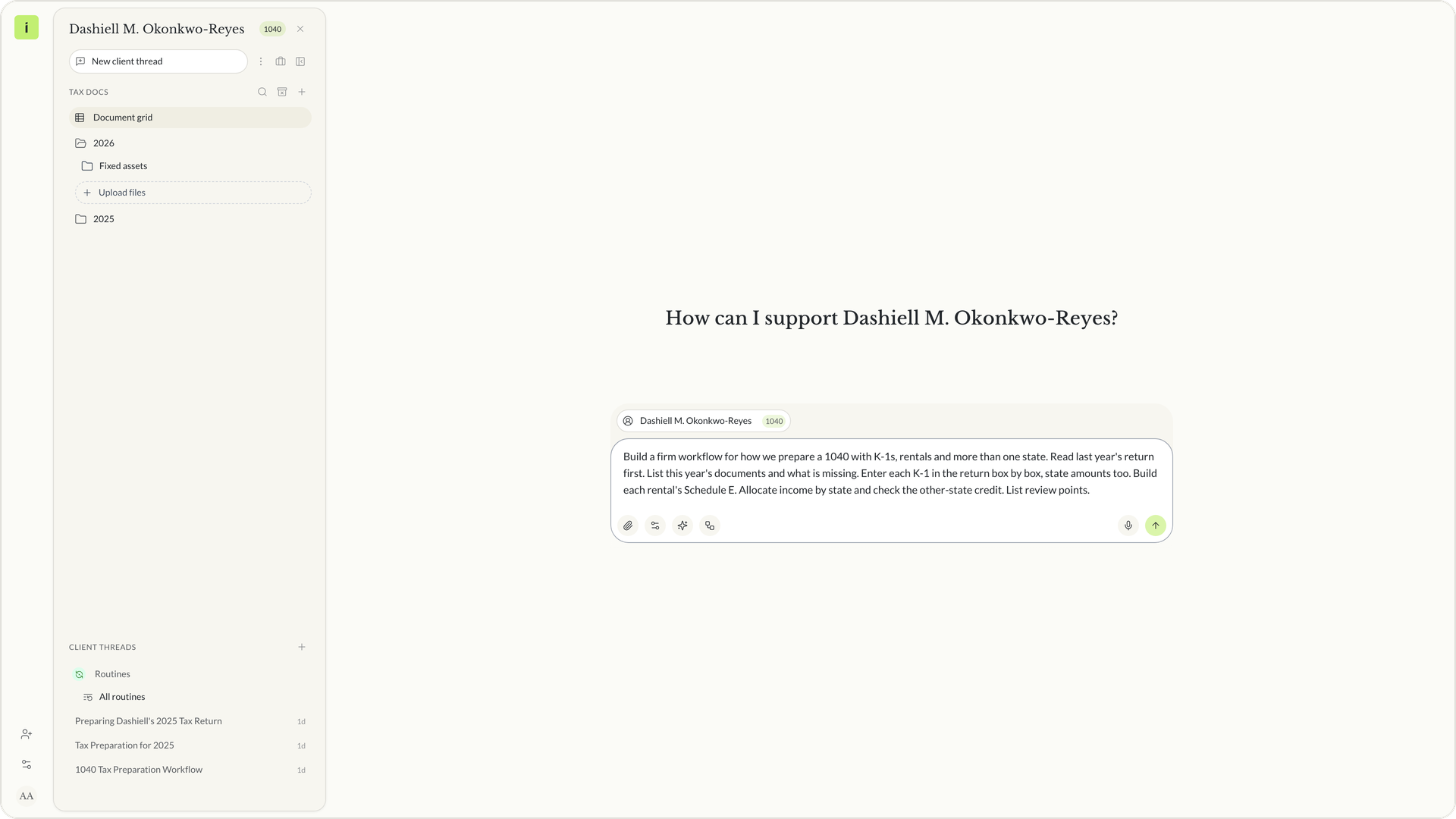 The build prompt typed in the client chat
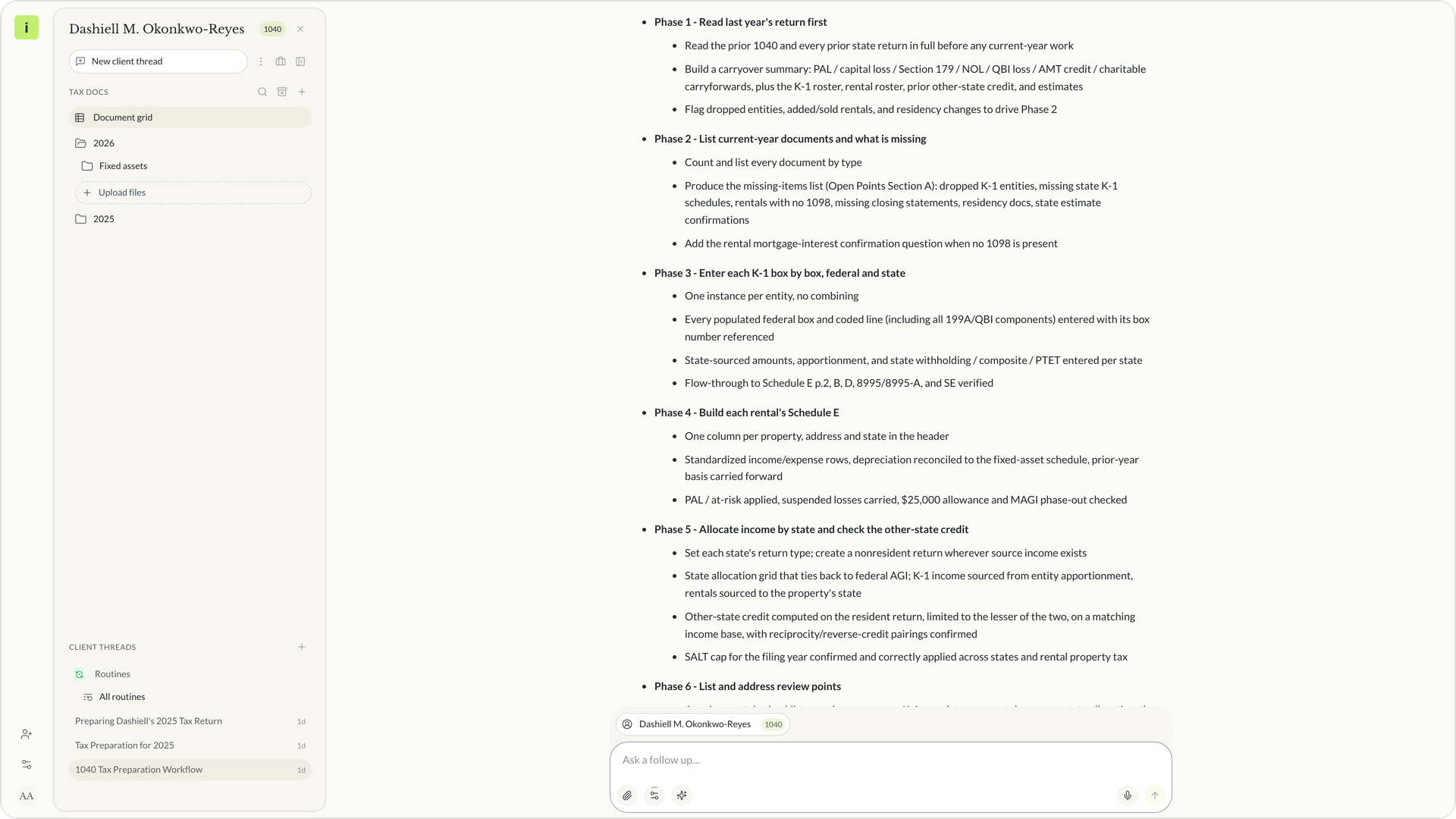 The agent's reply with the six steps
How to run a workflow on a client return
To run a workflow, open the client chat, choose the workflow from Firm workflows, and send what you want done. The workflow is attached to your message, and the agent works through your steps in order on that client's documents and return.
We ran it on a demo client, Dashiell M. Okonkwo-Reyes, with three K-1s, a 1099-DIV and a client organizer on file. We picked the workflow and wrote one line. Prepare Dashiell's 2025 return.
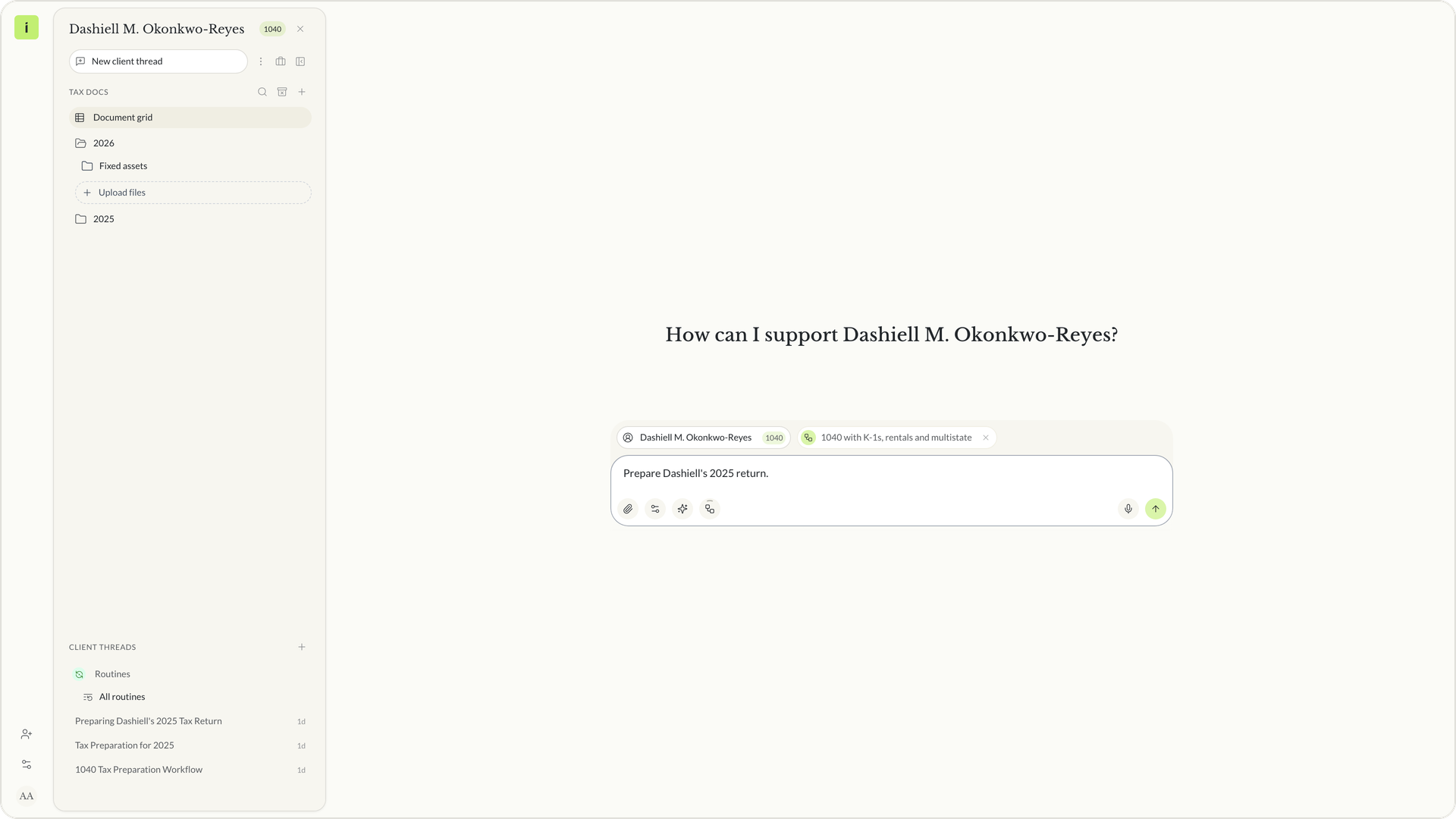 The workflow attached to the message in the client chat
The first run stopped at step 1 and asked a question. No 2024 return and no rental records were on file, so it asked how to proceed. We answered, proceed and flag them as open points.
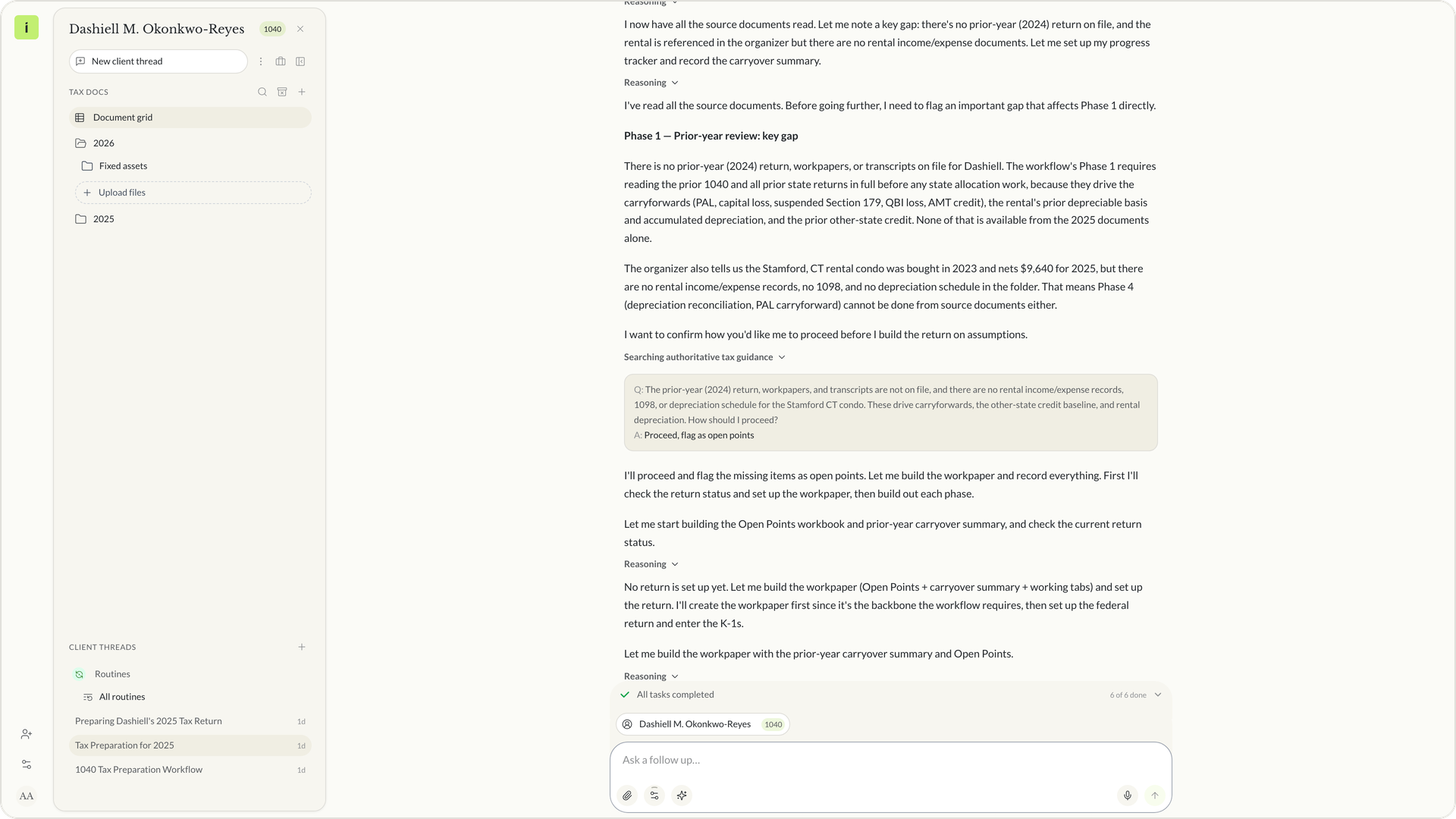 The run pauses and asks how to proceed
It then finished all six steps. It left a federal 1040, a New York resident return, nonresident returns for New Jersey, Pennsylvania, California and Connecticut, an Excel workpaper and a list of open points. Every return is a draft for review.
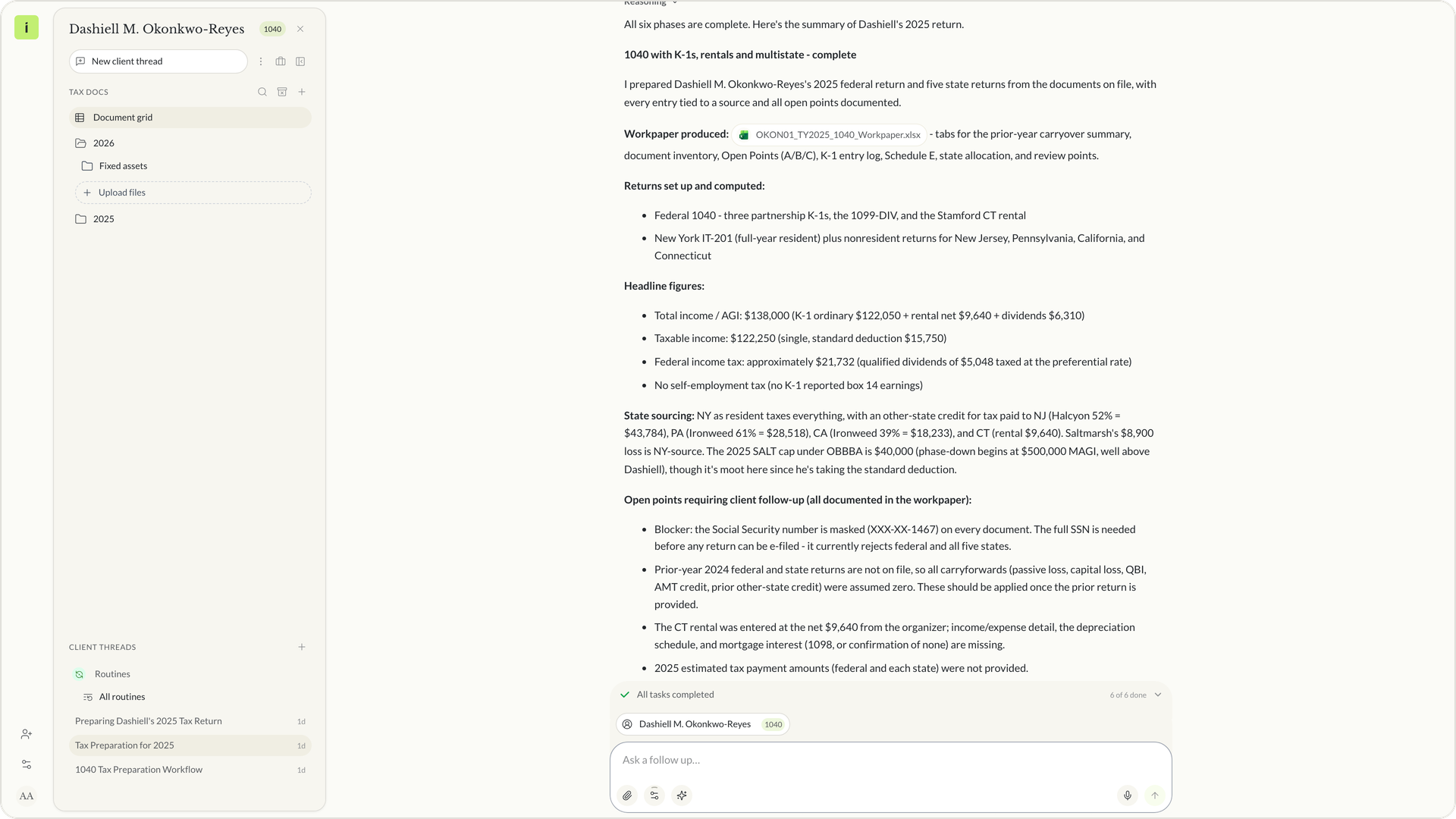 The first run's result
How to fix a workflow when the first run is not right
The first run of any workflow is a draft. Read it the way you would read a first draft from a new preparer. When something is not how your firm does it, fix the workflow, not the result. Edit the step in the editor, or tell the agent what to change, and it updates the workflow.
In our first run the agent stopped to ask about last year's return. Our firm does not want a run to stop for that. So we told the agent this in the same chat.
“Update the workflow. If last year's return is not on file, do not stop to ask. Work from the organizer, assume no carryforwards, and list what is missing as open points. Then finish with a client request list for the open points.”
The agent edited the first step of the workflow and the stop point after it. The first step now reads Read last year's return first (if on file). It also added a client request list with ten requests. The result of that run did not change by hand. The workflow did.
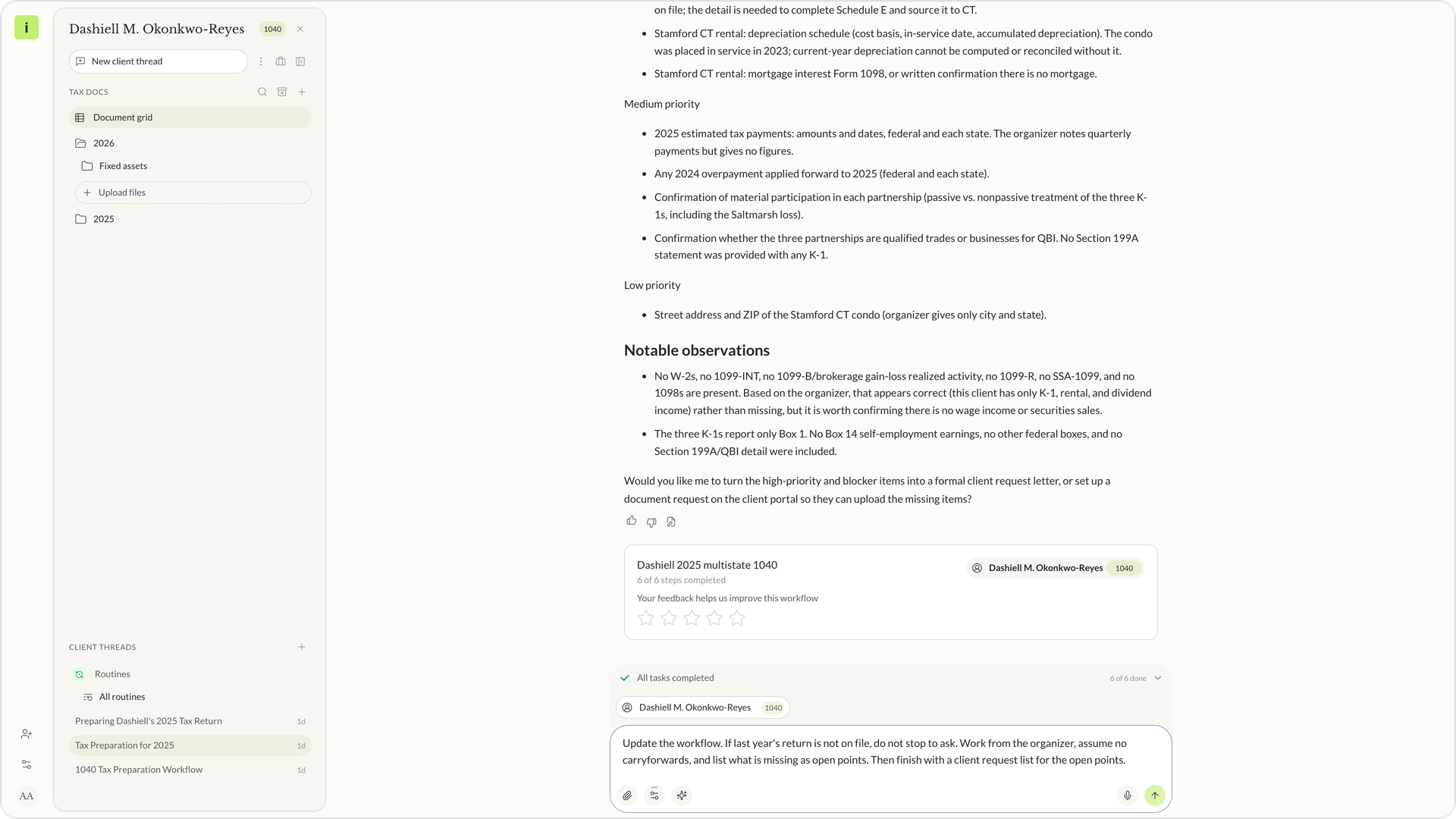 The fix typed in the chat
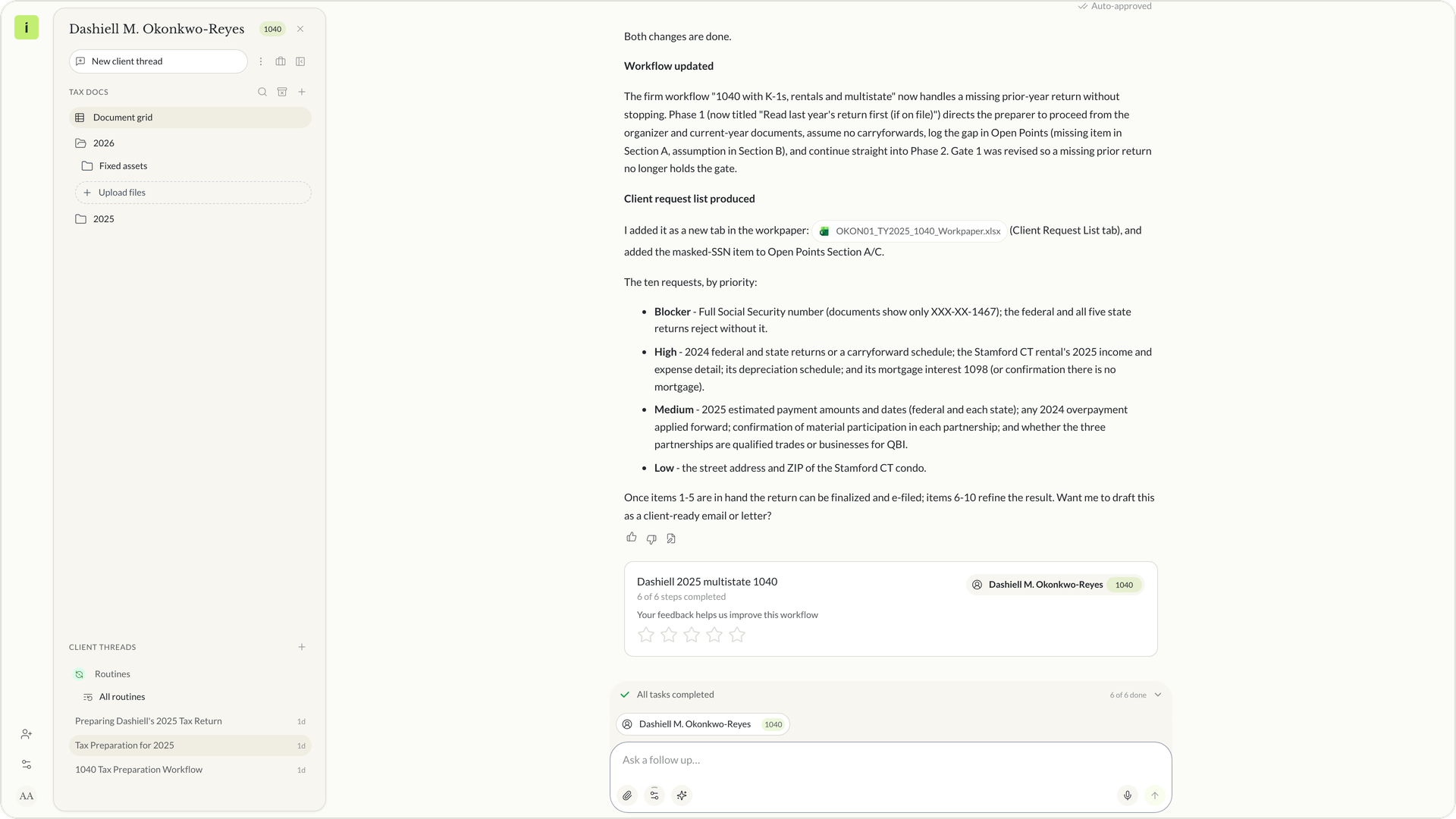 The agent's reply after it edited the workflow
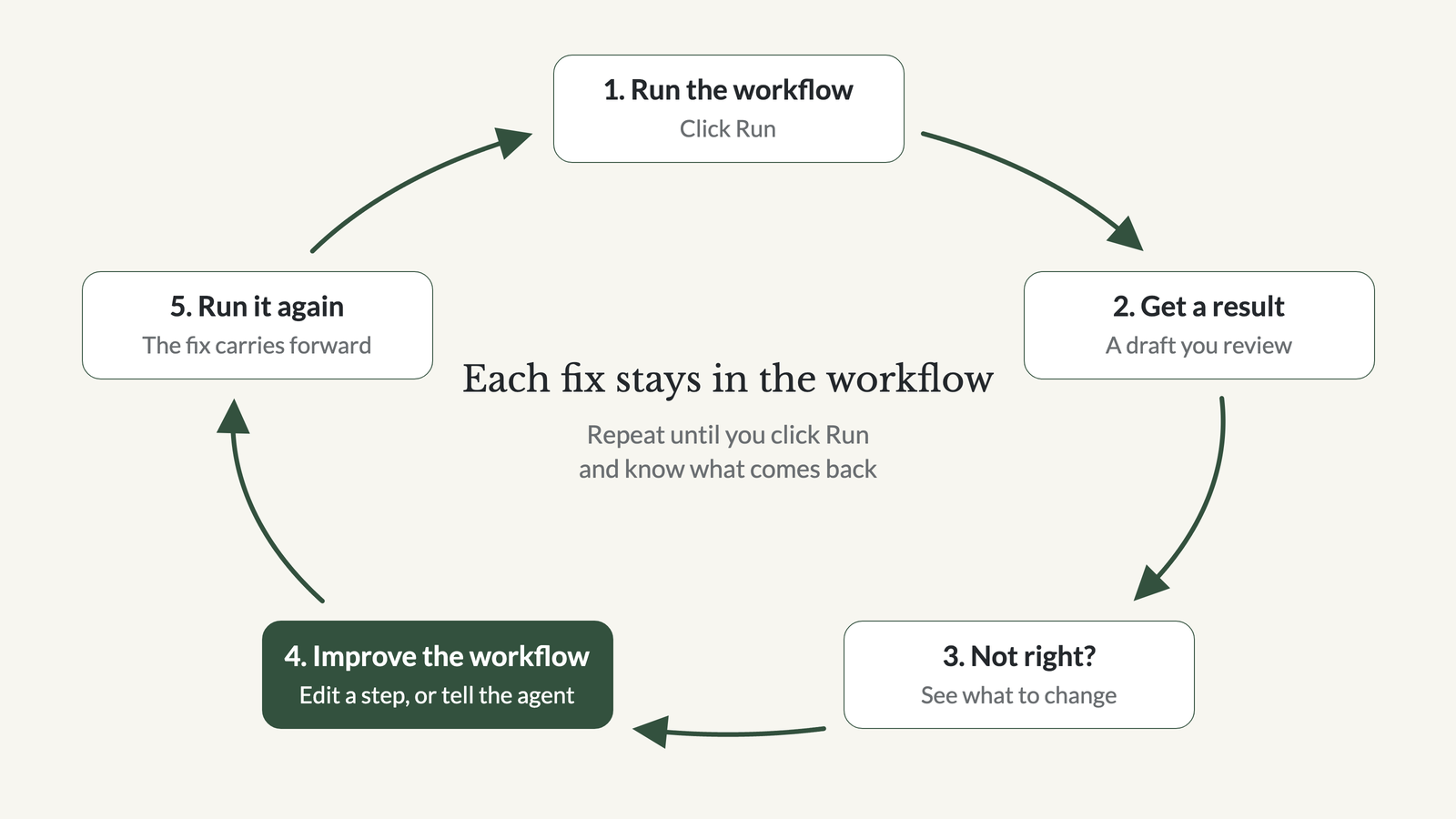 The loop. Run, review, fix the workflow, run again.
Why each run starts from your last fix
A run reads the workflow as it is saved. So when you fix a step, the next run starts from the fixed step. Open the workflow and the fix is there. The first step now carries the line If the prior-year return is not on file, do not stop to ask for it. The workflow does not get better on its own. It gets better because your firm fixes it.
We ran the workflow again on the same client.
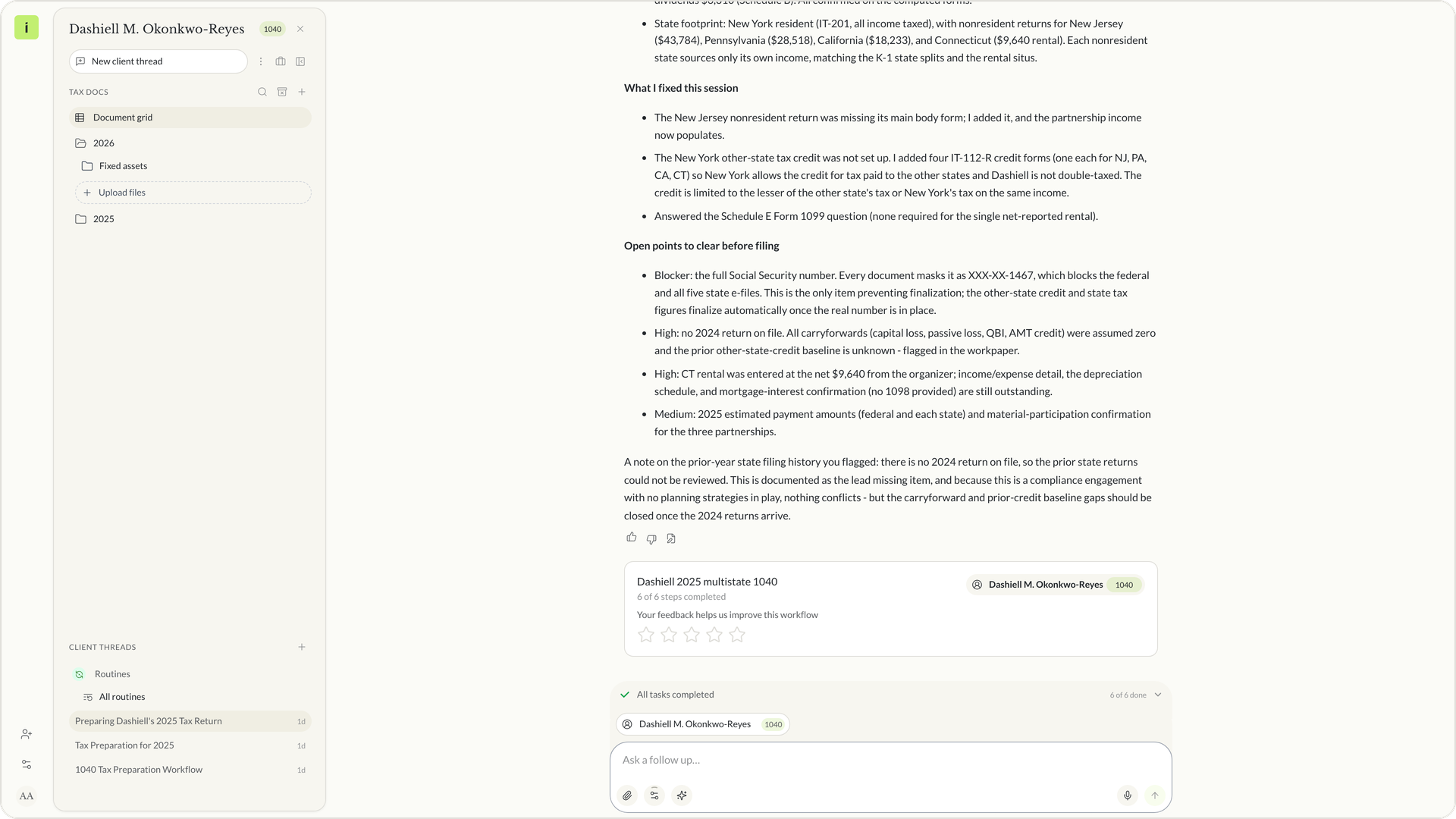 The second run's result
This time the run went from start to finish without stopping. It finished all six steps and asked no questions.
Over many runs this adds up. Each fix stays, so each run starts from everything you fixed before. That is the idea behind the line your firm's way, better every run.
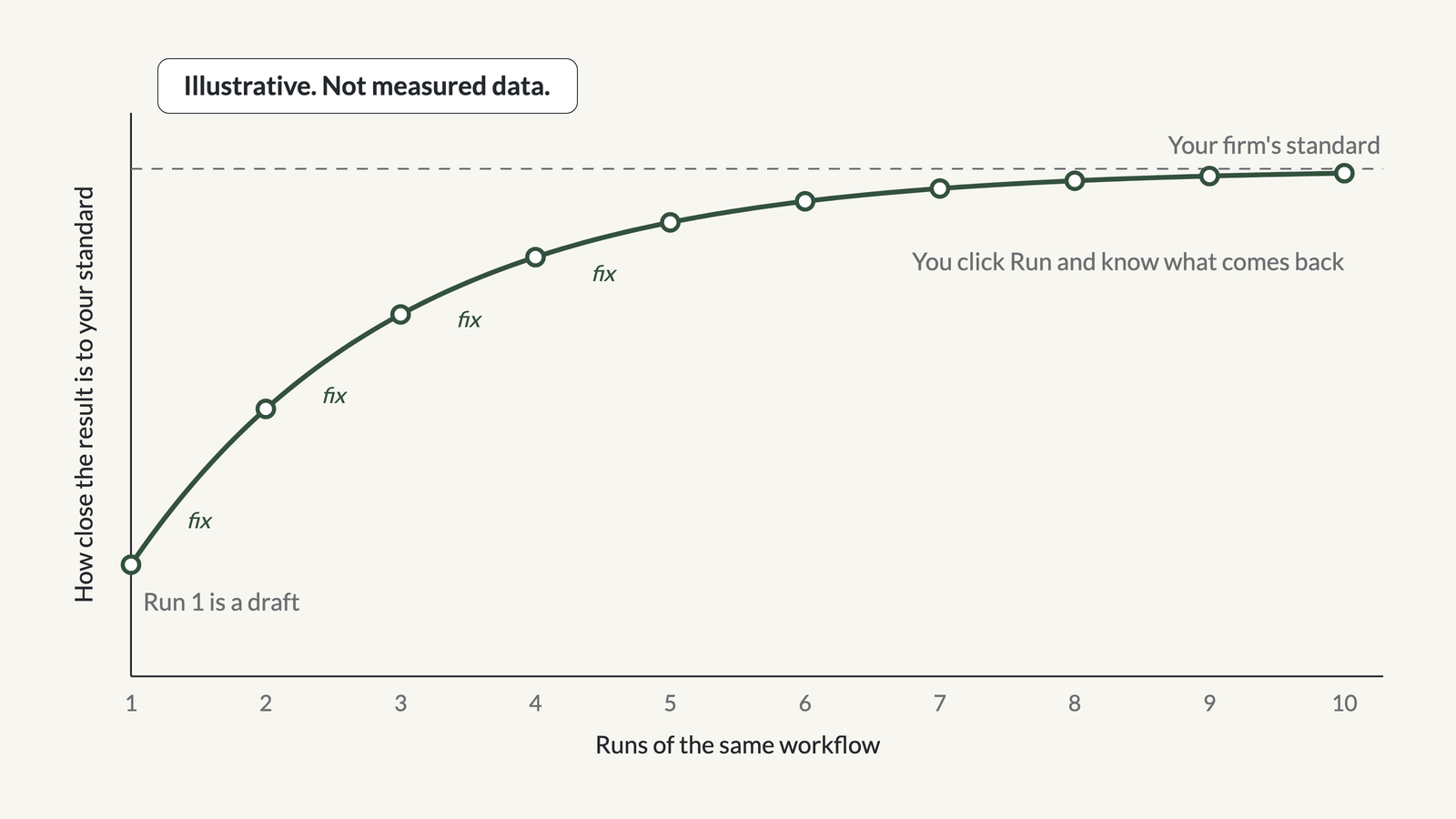 The curve. Illustrative. Not measured data.
A 1040 with K-1s from first run to second run
The hero test for this workflow was the K-1s. The step said to enter each K-1 in the return box by box, with state amounts too. In the return, the K-1 amounts came through from the documents.
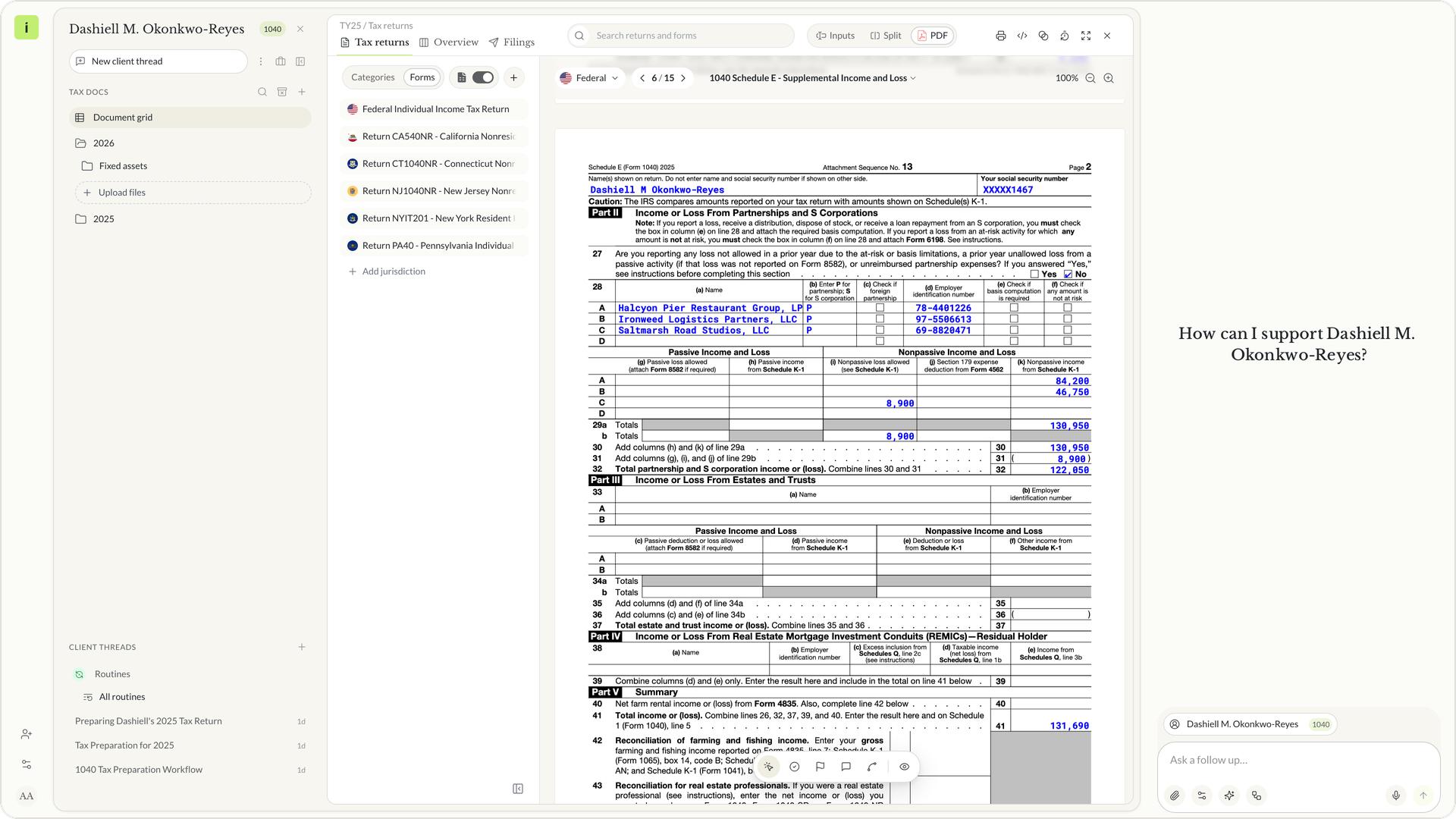 Schedule E page 2 with the three K-1s
On Schedule E page 2, line 28 lists all three K-1s. Halcyon Pier Restaurant Group, LP shows 84,200 and Ironweed Logistics Partners, LLC shows 46,750 as nonpassive income from Schedule K-1. Saltmarsh Road Studios, LLC shows a nonpassive loss of 8,900. Line 32 totals 122,050.
You still review the return. The workflow makes sure the same steps happen on every 1040 with K-1s, in your firm's order, and leaves you a list of open points to check.
Custom workflow examples for tax firms
A firm can write a workflow for any job it runs the same way on many clients. These are workflows firms build. Each result is a draft for review.
Tax returns. A 1040 with K-1s, rentals and more than one state. A 1065 with K-1s and a capital roll-forward. An 1120-S with shareholder basis and a reasonable comp check. A 1041 with a DNI workpaper. An amended return with an explanation of changes. Extensions for clients still missing documents.
Tax plans. A year-end plan with a strategy table. An entity choice and S corp reasonable comp memo. Retirement contribution options. Quarterly estimates.
Memos and letters. A research memo in the firm's format. A position memo for the file. A client advice letter. An engagement letter.
Tax resolution. A CP2000 response with an item-by-item table. A CP14 balance due letter. A penalty abatement request. An installment agreement. A review of the transcripts your firm uploads.
Onboarding and review. New client onboarding from the prior preparer's return. A trial balance tie-out workpaper. Missing documents across the clients you pick.
Instead workflows for return prep, return review, tax plans and estimates are there to start from. Instead covers 1040, 1041, 1065, 1120 and 1120-S returns for TY25, and TY26 adds 706, 709, 990, 5500, 2290 and PPT.
In our demo firm, one message in the firm chat built six of these as firm workflows. CP2000 Response, Penalty Abatement Request, S Corp Reasonable Compensation Memo, Research Memo, Client Advice Letter and New Client Onboarding.
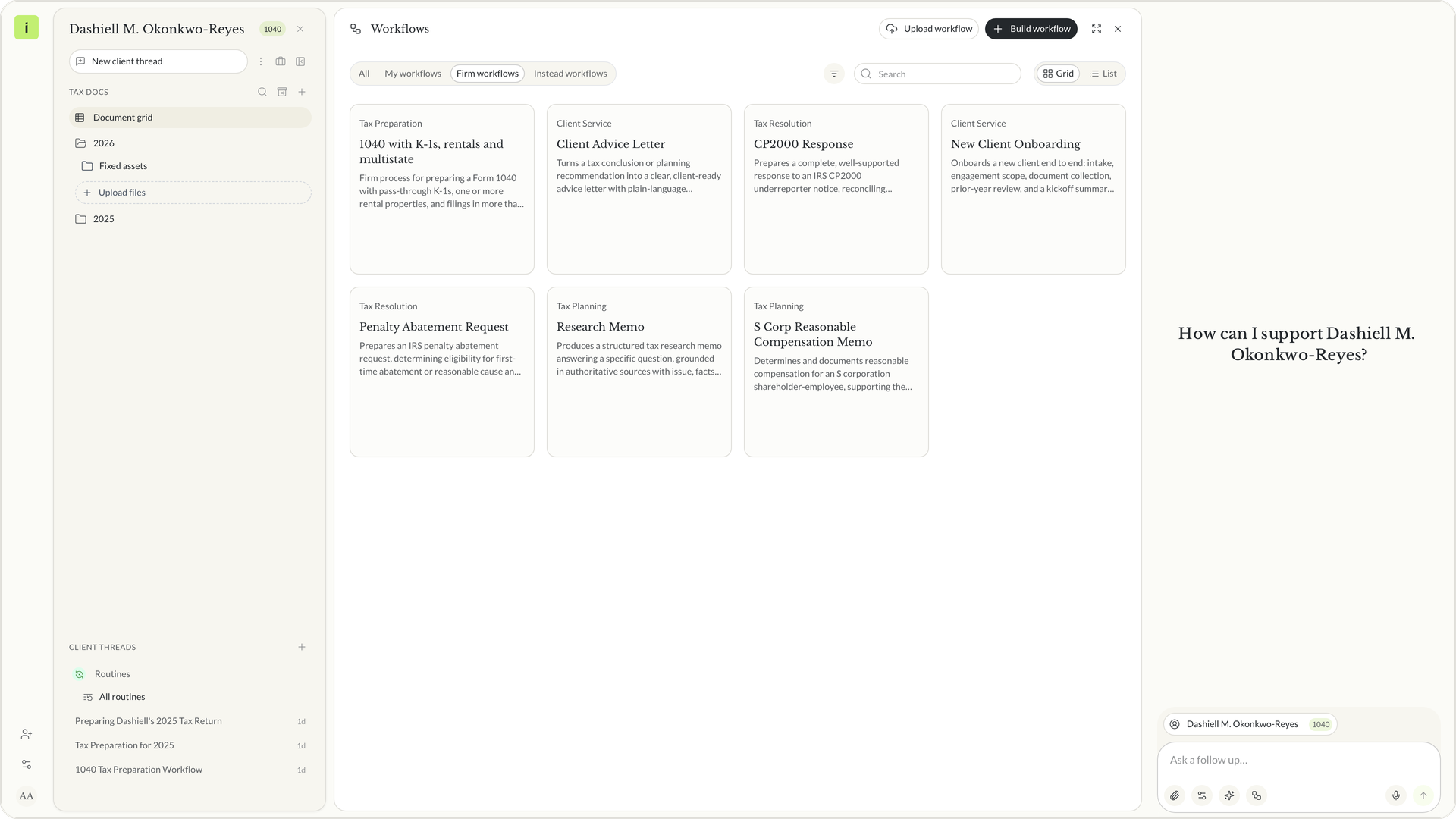 Firm workflows tab with several firm workflows

Free white paper
Your firm's way, better every run
How custom workflows hold your firm's process, one fix at a time
The loop, a 1040 with K-1s from first run to second, and 30 workflows firms build. Free PDF.
Download the white paperCustom workflows compared with general AI assistants and tax research tools
Firms that want AI to follow their process tend to look at three kinds of tools. Here is how they differ from a custom workflow in Instead.
General AI assistants. ChatGPT lets anyone build a GPT with instructions and extra knowledge and share it. Claude has Skills, folders of instructions, scripts and resources it loads when a task calls for them. Gemini has Gems, which let you customize Gemini as an expert on any topic. They are built for any kind of work.
Tax research platforms. CCH AnswerConnect is Wolters Kluwer's research platform for tax and accounting professionals, and it added AI summaries in 2025. Research platforms answer tax questions.
Newer AI tax tools. CoCounsel came to Thomson Reuters with its purchase of Casetext in 2023. Blue J offers agentic workflows built on its tax research engine. TaxGPT offers tax research and tax preparation products.
In Instead, the workflow is written by your firm, kept in your firm's library, and run on the client's own documents and return. The fixes are yours, and they stay in the workflow.
What to ask before you build your first workflow
Start with the job you run most and the steps your reviewers already check. These questions help you pick it.
Questions to ask before you commit:
- Which job does your firm run the same way on many clients?
- What does a reviewer check first, and is that a step yet?
- Where does your checklist live today, and who still opens it?
- What would you fix after the first run, and who owns that fix?
- Who at the firm should be able to run the workflow?
How custom workflows would work at your firm
Pick the job your firm runs most and tell the agent your steps. Run the workflow on one client, read the draft, fix the workflow, and run it again. See how it fits the Instead AI tax platform, read the white paper, or start your trial at instead.com.
Frequently asked questions
Q: Can I build a workflow without writing it from scratch?
A: Yes. Tell the agent your steps in a client chat and it writes the workflow with named steps. You can also type the steps in the editor, or upload the checklist you already keep as a Word, text or Markdown file. Instead workflows for common returns and tax plans are a starting point too.
Q: Does a custom workflow get better on its own?
A: No. The improvement comes from your firm. When a run is not right, you edit a step or tell the agent what to change, and the workflow updates. Each fix stays in the workflow, so the next run starts from it. You decide what changes, and you review every result.
Q: Who at the firm can run a custom workflow?
A: Anyone at the firm can run a workflow in Firm workflows from a client chat. A workflow in My workflows stays yours until you share it with the firm. Sharing needs the permission to edit firm workflows, which firm owners have, so the firm controls what everyone runs.
Q: Is the result of a workflow run ready to file?
A: No. Agent output is a draft. A run gives you work to review, such as entries in the return and a list of review points, the same way a new preparer hands you a first draft. You review it, you decide, and you file through your normal process.
Q: What kinds of workflows can a tax firm build?
A: Firms build workflows for returns by form, including 1040s with K-1s and 1065, 1120, 1120-S and 1041 returns (TY26 adds 706, 709, 990, 5500, 2290 and PPT), plus tax plans, research memos, client letters and IRS notice responses such as a CP2000. Each one follows the steps your firm writes, and every result is a draft for review.


Ask any question across all your clients

Tax research, then put the answer to work


.png)